|
DVD-Video authoring: |
|
|
Encoders/convertors: |
|
| Video editing: |
|
You can send me an e-mail: [email protected] |
|
Digital
audio software for
making surround music:
|
|
| DVD-Audio authoring: |
|
SOFTWARE REVIEW:
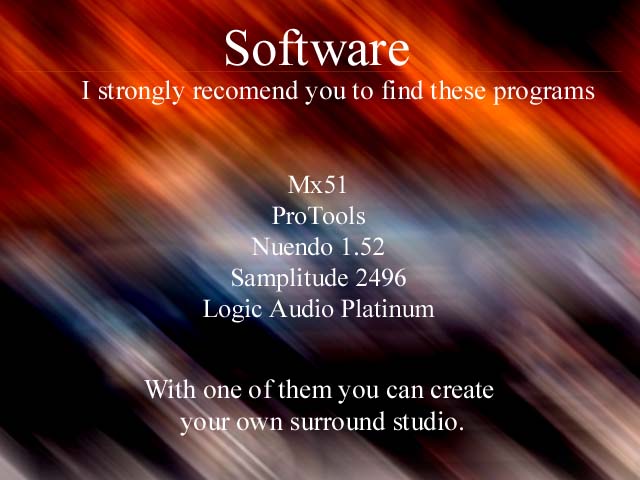
Digital audio software for making surround music: Here are some of the most
important programs for making surround music. Imagine that you can "move"
the position of the sound in real time. Move some sounds to front, then to left,
then to right. And if you really have 6 speakers placed in your room you can
feel the sound moving. Real Surround in real time. First you can download the
demo version of SekD Samplitude 2496. The demo is workable.
DVD-Audio authoring: You can search the net for more information about
DVD-Audio. This is a new standart for digital music. DVD-Audio -> 192 khz, and
24 bits instead of 44,1 khz and 16 bits in usual CD. DVD-Audio can be multichannel,
up to six independant channels. See the Links above for more information.
Super Audio CD is another High Definition Audio format - about 100 khz frequency
range and 1 bit resolution. Here 1 bit doesn't mean worse. You can search for
more information about Direct Stream Digital (DSD). Super Audio CD (SACD) use
DSD to record audio information on the disc. DVD-Audio authoring is a process of
copying WAVE files to DVD disc. DVD-Video authoring is a process of copying video
files (mpeg, avi) to DVD disc. But again this is not usual coping but complex and
big artwork. There are a few programs for DVD-Audio and many others for
DVD-Video authoring. See the tables and links above.
Encoders/convertors:  After mixing with programs like mx51, nuendo,
samplitude 2496, protools or Logic Audio user may export the result surround mix
to 6 independant files - every surround channel will be in one file - LEFT, CENTER,
RIGHT, LEFT SURROUND, RIGHT SURROUND, LOW FREQUENCY EFFECTS - six files
for six channels. Imagine that you have one WAVE file for right speaker,
one WAVE file for left, one for center, and so on. SurCode can convert the six
wave files to one in DTS format. SoftEncode can convert the six wave files to one
in Dolby Digital format.
Video editing: These programs are for non linear video editing (NLE). With them
you can add visual effects to some video clips (mpg, avi and others). Also you can
edit video files and you can make your own remixes of famous video clips.
Both Media Studio and Adobe Premiera are real profesional programs and are
used in many video and tv studios.
LINKS
Genereal Information about Surround Sound
FAQ about Surround Sound
Another FAQ about Surround Sound

Companies (Surround Sound)
Dolby
Dolby, interactive sound kit
DTS Online
Meridian
Chesky Records

Other links about Surround Sound
General Home Theater
Digital Audio Guide
Surround Associates
Dolby digital, Dolby Surround, THX surround EX
Surround Music
SMR AUDIO FORUMS
SMR
Time for DVD - Surround Sound Formats
Time for DVD - DTS
Lake DSP
3D AUDIO TECHNIQUES
Audio publicatons

General Audio LINKS
Audio Links
3D and Surround LINKS
Ultimate Spatial Audio Index
Links about HI-FI on the net
Links about DVD

Other Audio LINKS
HeadWize
CRMAV
PROREC
Digital Digest
ASPEN MEDIA
Audio Asylum
Super Audio CD (SONY)
DVD-Audio/Super Audio CD
Audiomedia (magazine)
OmniSound
The GENERAL PURPOSE of this site is to provide you with information about how you can make your own surround music. Like other profesionals make surround sound tracks you can make surround music too. I want to ensure you that is not so hard to make surround music in your home. If you have Windows installed and if you find some of programs shown above you can start working. Of cource you need surround amplifier and six surround speakers. And the general problem is where and how you can find surround sound blaster. It doesn't work with usual stereo sound blaster. You need sound card with six outputs (stereo means two outputs - left and right). So the first: you can buy expensive sound card with six independant outputs or the second: you can bay three sound blasters (for PCI slot) and to run them on Windows. You can put three sound blasters in your PC and is better to be from different companies - so the drivers to be different. And then if you configure your BIOS - there must be a different IRQ for every sound blaster then you can success. Call me via e-mail if you don't understant how you can run three sound blasters on one PC: [email protected]